
DEVELOPER NOTES / INTEGRATION
Arcane Foundry
in Unity.
Playback, JSON presets and capture notes for the supplied C# runtime.
Tested setup
| Editor | Unity 6000.6.7f1 |
|---|---|
| Render pipeline | Universal Render Pipeline 17.6.0 |
| Verified player | Windows x64 / Direct3D 12 |
| Demo & Editor tools | Input System 1.20.1 |
The runtime assembly has no Input System dependency. Built-in, HDRP, other Unity versions and other platforms are unverified.
Play a spell through the pool
Add a VfxPool component to a scene object. In your gameplay script, assign that pool and one of the supplied SpellDefinition assets. Pass world-space ground positions; the effect adds its visual height.
using ArcaneFoundry;
using UnityEngine;

public sealed class SpellPreview : MonoBehaviour
{
    [SerializeField] VfxPool pool;
    [SerializeField] SpellDefinition spell;
    [SerializeField] Transform target;

    public void Cast()
    {
        if (!pool || !spell || !target) return;
        pool.Spawn(spell, transform.position, target.position);
    }
}
Call Cast() from your animation event, input handler or ability system. The effect returns to its pool when playback completes.
Prewarm during loading
// Run from a MonoBehaviour coroutine.
yield return pool.Prewarm(spell, count: 8, perFrame: 2);
Choose a count appropriate to your expected simultaneous casts. Prewarming prepares inactive instances over multiple frames; it does not remove the cost of rendering active effects. Profile in your own scene, at your intended camera scale.
Edit a preset
JSON stores appearance settings, not arbitrary asset paths or gameplay behavior. Export a complete preset from a definition, adjust the fields you need, then validate it through the preset API.
{
  "schemaVersion": 3,
  "effectId": "fire.flame_wall",
  "primaryColor": "#F35B1EFF",
  "accentColor": "#FFE298FF",
  "sigilDetail": "None",
  "sigilOpacity": 0.3,
  "sigilBrightness": 0.35,
  "readabilityEnabled": true,
  "coreOpacity": 0.6,
  "edgeStrength": 0.55,
  "glowIntensity": 1.0
}
This is an excerpt, not a complete import file. Keep the timing, scale, radius and other fields from the exported preset. Set sigilDetail to Light, Medium or Detailed to show a ground sigil.
Keep asset templates intact
For runtime variations, use SpellPresetJson.TryCreateRuntime(json, catalog, out definition, out error). It resolves the effect ID through your local SpellCatalog, clones the definition and validates the settings. Use the resulting definition for playback, then destroy it after all effects using it have finished.
TryApply changes its destination definition directly. Use a runtime copy when changes should be temporary. Invalid imports return an error without partially applying settings.
Use individual phases
Use the complete prefab for a full visual sequence. When your gameplay or animation system owns the timing, use the Cast, Release, Impact and Afterglow entry prefabs instead.
| Included | Purpose |
|---|---|
| 150 complete prefabs | The full spell sequences. |
| 600 phase-entry prefabs | Four entry points for each of the same 150 designs. |
| 30 ground sigils | Light, medium and detailed treatments for each domain. |
Related designs share composition families and renderer modules. The phase-entry count does not represent additional unique spells.
Recording offscreen
Physical pieces use instanced graphics submissions in LateUpdate. A spell spawned immediately before a manual camera render can therefore be missing its physical ice, stone, wood or bone.
- Keep a camera enabled and render through the normal player loop.
- Assign its
RenderTexturebefore rendering. - Allow effect updates and instanced submissions to complete.
- Read the texture after the rendered frame finishes.
The package includes the full offscreen-capture guide, covering end-of-frame ordering, the existing merged-mesh fallback for custom tooling and primary-camera billboard behavior.
The website showcase is an offline capture at 1080p / 30fps. It demonstrates motion and density; it is not a real-time performance benchmark.
Readability on lighter ground
Bright glow alone can disappear on pale terrain. The appearance presets expose core opacity, edge strength and glow intensity so you can balance the effect against your scene.
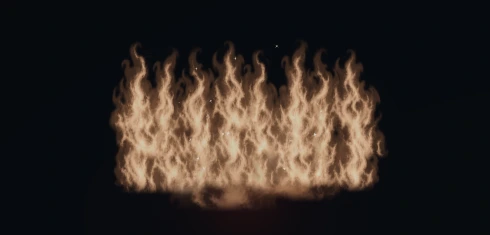
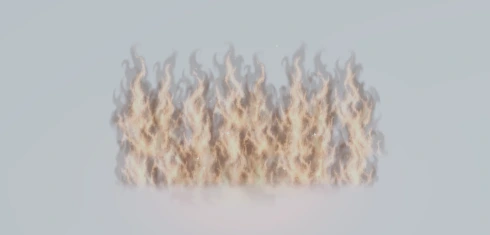
Flame Wall shown at the same pose on both surfaces, captured in Unity. The supplied readability lab also includes grass, sand and snow. Test the balance with your own lighting, exposure and camera scale.
Visual limits to plan around
Atmospheric bodies use camera-facing textured layers, with physical meshes where appropriate. They are composed for isometric views, rather than arbitrary close-up volumetric inspection.
The ground feather assumes a locally horizontal plane at the target height. It does not conform to arbitrary terrain, or soften every intersection against actors and walls. Check your intended camera angles and terrain during integration.
The package supplies visual effects. Damage, healing, teleport movement, targeting, collision handling, networking and audio remain part of your game.
Get support
Email fireblade1232007@gmail.com with your Unity version, render pipeline and spell name. Describe the expected result and what you see; a small reproduction or screenshot helps.